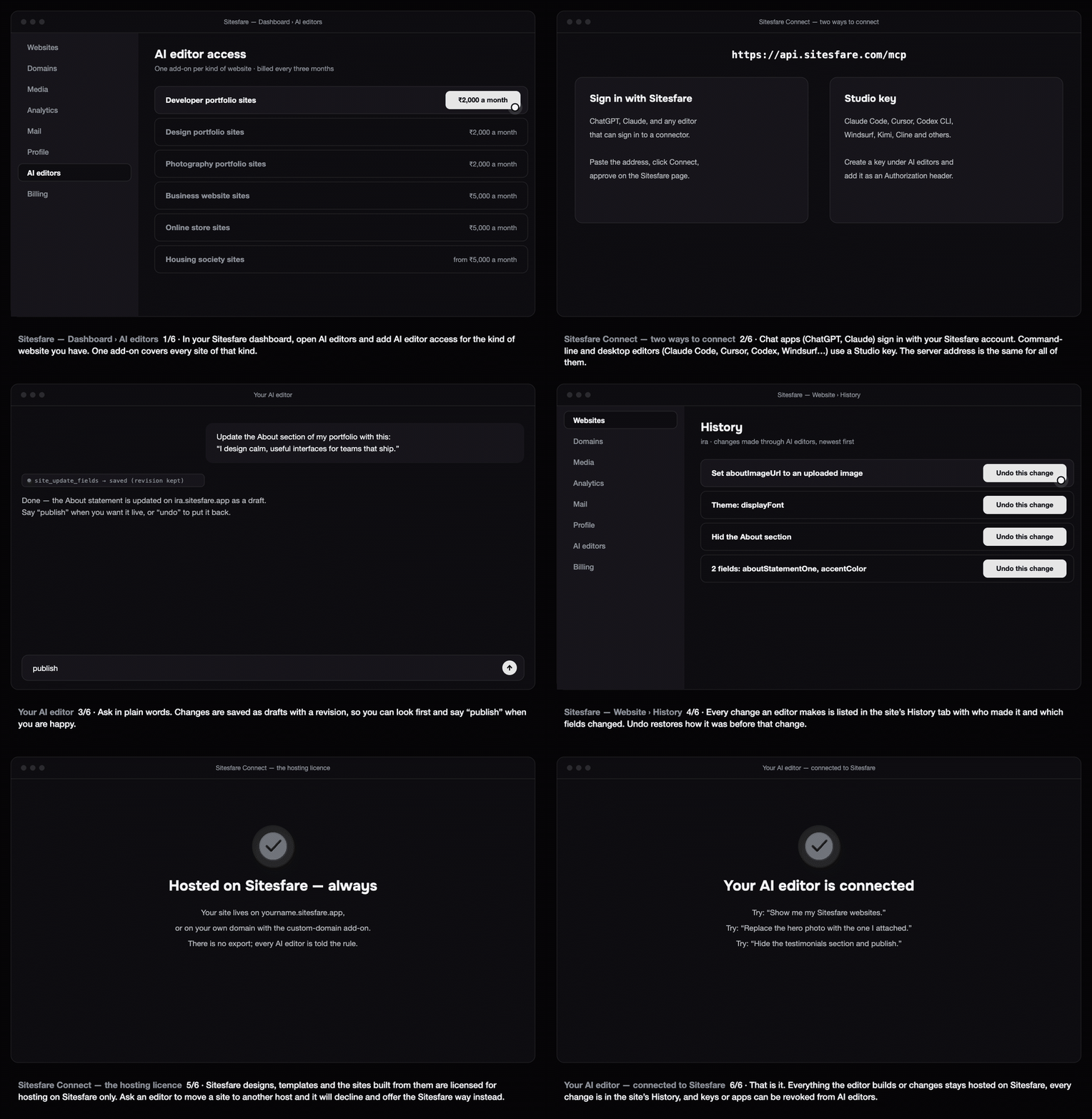
Sitesfare Connect lets the AI editor you already use — ChatGPT, Claude, Cursor, Claude Code, Codex, Windsurf, Kimi, Cline or any other editor that speaks MCP — read, edit, publish and build your Sitesfare websites. You talk; it changes the site; everything stays hosted on Sitesfare.
What you need
-
A Sitesfare account with a website (any template), and the tool for its category.
-
AI editor access for that kind of website — an add-on under Dashboard → AI editors. One add-on per kind covers every site of that kind on your account:
- developer, design and photography portfolios: ₹2,000 a month
- business websites and online stores: ₹5,000 a month
- housing societies: ₹5,000 a month for up to 50 flats, more for larger societies
Billed every three months (the first term is the minimum); cancel any time after that.
Two ways to connect
Every editor talks to the same address: https://api.sitesfare.com/mcp.
| Editor | How it connects | Guide |
|---|---|---|
| ChatGPT | Sign in with Sitesfare (or a Studio key as a token) | Connect ChatGPT |
| Claude (claude.ai, desktop) | Sign in with Sitesfare | Connect Claude |
| Claude Code | Studio key, or sign in with /mcp | Connect Claude Code |
| Cursor | Studio key (or sign in) | Connect Cursor |
| Codex CLI | Studio key in an environment variable, or codex mcp login | Connect Codex CLI |
| Windsurf, Kimi, Cline, others | Studio key | Connect any MCP editor |
Sign in with Sitesfare is the simplest: the editor sends you to a Sitesfare page that shows exactly what it may do (read sites, change content, publish, upload images); you click Allow. You can disconnect it any time under AI editors → Connected apps.
A Studio key is for command-line and desktop editors. Create one under AI editors → Studio keys — it is shown once, works like a password, carries only the scopes you tick, and can be revoked at any time. Give each editor and computer its own key.
What an editor can do
- Read a site: its sections, fields, theme and media — and the page as text, so it can match a screenshot to a section.
- Change words, links, dates and photos; hide or show sections and repeating items (projects, events, photos…); change the accent colour, fonts, mood and per-section backgrounds.
- Upload images to your media library, publish, read the history and undo a change.
- Start a new site from any of the templates, and read the template's design kit — palette, typography, tokens, sections — to edit in its voice; download the official kit (AI editors → Design kits, or
kit_download). - Build a design or app of its own and host it on Sitesfare — see Build and host your own design or app from an AI editor.
It cannot change a template's own code: the design lives on Sitesfare. See Edit a section from a screenshot, text or photos for how to ask.
Drafts, publishing and undo
Every change an editor makes is saved as a draft on the site and kept in the site's History (dashboard → your website → History) with who made it and which fields changed. Say "publish" to put the draft live. Undo this change in History — or asking the editor to undo — restores the content as it was before that change; a revert can itself be undone.
Safety
- An editor only gets the access you give it: the scopes on a key, or what you approved at sign-in.
- Every value is checked before it reaches a site (text lengths, colours, image links); scripts and HTML in a field are refused.
- Every action is logged under AI editors → Activity, with its result.
- Payment details, passwords and other accounts are never involved — the editor never sees them.
The hosting licence
Sitesfare designs, templates, design kits and the websites built from them are licensed for hosting on Sitesfare only. There is no export, and every editor connected to Sitesfare is told the rule. Ask it to move a site to Vercel, GitHub Pages or any other host and it will decline and offer the Sitesfare way instead: your yourname.sitesfare.app address, or your own domain with the custom-domain add-on.
Troubleshooting
- "This account does not hold AI editor access …" — add the add-on for that kind of website under AI editors. The message names the add-on and the price.
- 401 / "unauthorized" — the key was revoked, mistyped, or pasted with spaces. Create a new one. For a signed-in app, disconnect and connect again.
- "This site runs the account's own code" — template tools edit template sites; own-code sites use the app tools (app_files, app_put_files, app_deploy). See Build and host your own design or app.
- The editor refuses to export the site — by design; see the hosting licence above.
Questions
Which editors work?
Any editor that speaks MCP over HTTP: ChatGPT, Claude (claude.ai and desktop), Claude Code, Cursor, Codex CLI, Windsurf, Cline, Kimi and others. There are step-by-step guides for each.
Do I need a separate add-on for each website?
No. One add-on per kind of website covers every site of that kind on your account — for example, one “design portfolio” add-on covers all your design portfolio sites.
Can the AI break my site?
Every value is checked before it is saved (lengths, colours, image links), the template’s own code cannot be changed, and every change is kept in History with one-click undo.