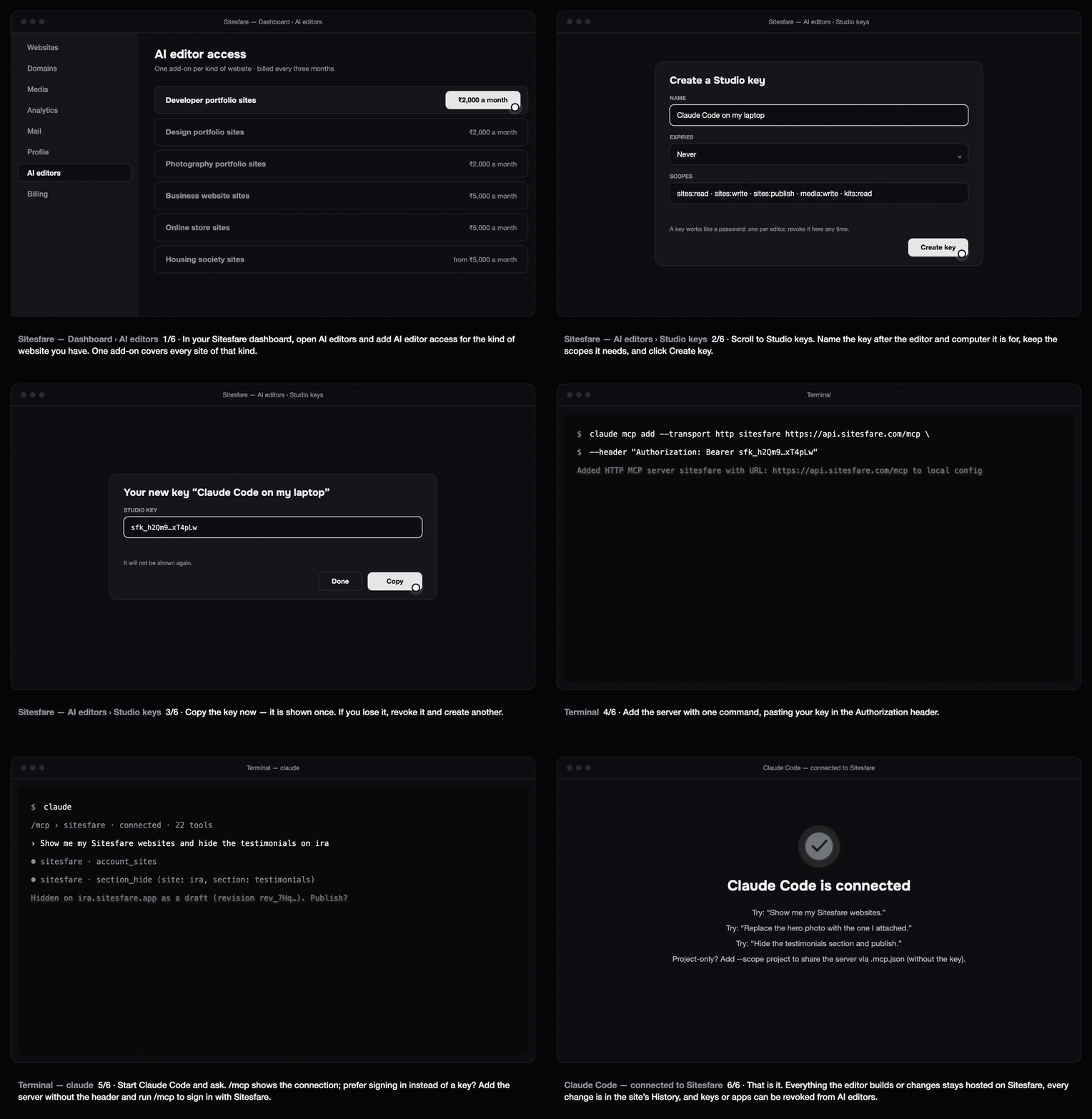
Claude Code can edit, publish and undo changes on your Sitesfare website from the terminal. One command adds the server.
Before you start
- In your Sitesfare dashboard open AI editors and add AI editor access for the kind of website you have. See how Sitesfare Connect works.
- Create a Studio key: AI editors → Studio keys → name it (for example "Claude Code on my laptop") → Create key → copy it. It is shown once.
1. Add the server
claude mcp add --transport http sitesfare https://api.sitesfare.com/mcp \
  --header "Authorization: Bearer <your Studio key>"
Claude Code confirms: Added HTTP MCP server sitesfare…. The key is stored in Claude Code's own config on your computer.
Prefer signing in instead of a key? Add the server without the header, start claude, type /mcp, choose sitesfare and follow the sign-in — you approve on the Sitesfare page and come back connected.
claude mcp add --transport http sitesfare https://api.sitesfare.com/mcp
2. Use it
$ claude
> /mcp                     # sitesfare · connected
> Show me my Sitesfare websites and hide the testimonials on ira
Claude Code calls the Sitesfare tools (account_sites, section_hide…), saves the change as a draft and tells you. Say "publish" to put it live. Every change is in the site's History in the dashboard with one-click undo — or just say "undo that".
Things to try:
- "Replace the hero photo with ./hero.jpg" — it uploads the file to your media library and sets the field.
- "Here's a screenshot of the section — change the heading to 'Selected work'."
- "Change the display font to Syne and the accent to #1F6F4A, then publish."
- "Start a new photography site called studio-ira from the Darkroom template."
Sharing with a team
Add the server with --scope project: the server URL goes into .mcp.json in the repository (without any key), and each person signs in with /mcp or sets their own header.
Troubleshooting
- 401 / unauthorized — the key was pasted incompletely (it starts with
sfk_and is 47 characters) or was revoked. Create a new one and runclaude mcp remove sitesfarethen add it again. - "This account does not hold AI editor access…" — add the add-on for that kind of website under AI editors; the message says which one.
- The server shows as failed — check you used
--transport http(not sse or stdio) and the exact URLhttps://api.sitesfare.com/mcp.
Questions
Can I sign in instead of using a key?
Yes. Run claude mcp add --transport http sitesfare https://api.sitesfare.com/mcp without the header, then type /mcp inside Claude Code and choose Sitesfare to sign in with your account.
Where is the key stored?
In Claude Code’s local config on your computer (user scope by default). Revoke the key from AI editors if the computer changes hands.
Can my team use it from a shared repo?
Add the server with --scope project; the URL goes into .mcp.json without the key, and each person signs in with /mcp or sets their own header.