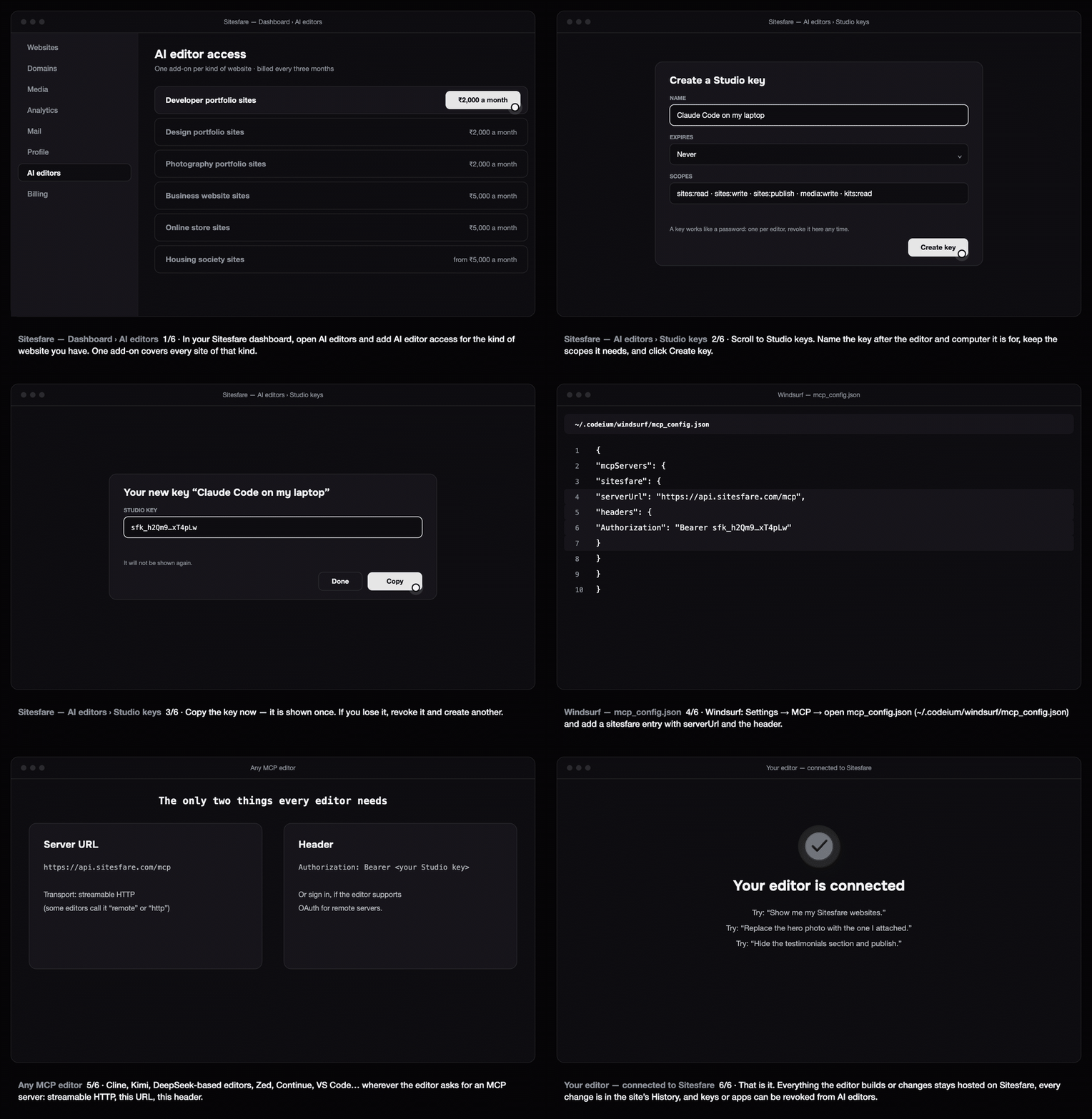
Any editor that speaks MCP over HTTP can edit, publish and undo changes on your Sitesfare website: Windsurf, Cline, Kimi, DeepSeek-based editors, Zed, Continue, VS Code's agent mode and others. They all need the same two things.
Before you start
- In your Sitesfare dashboard open AI editors and add AI editor access for the kind of website you have. See how Sitesfare Connect works.
- Create a Studio key: AI editors → Studio keys → Create key → copy it. It is shown once.
The two things every editor needs
| Value | |
|---|---|
| Server URL | https://api.sitesfare.com/mcp (transport: streamable HTTP — some editors call it "remote" or "http") |
| Header | Authorization: Bearer <your Studio key> |
If the editor supports signing in to remote servers (OAuth), you can leave the header out and approve on the Sitesfare page instead.
Windsurf
Open Settings → MCP (or Windsurf Settings → Cascade → MCP servers) and edit ~/.codeium/windsurf/mcp_config.json:
{
  "mcpServers": {
    "sitesfare": {
      "serverUrl": "https://api.sitesfare.com/mcp",
      "headers": {
        "Authorization": "Bearer <your Studio key>"
      }
    }
  }
}
Save and refresh the MCP list; sitesfare appears with its tools. Ask Cascade in plain words.
Cline (VS Code)
Open the MCP Servers panel → Remote Servers → add sitesfare with the URL https://api.sitesfare.com/mcp. Then open cline_mcp_settings.json (gear icon) and add the header to the entry:
"sitesfare": {
  "url": "https://api.sitesfare.com/mcp",
  "headers": { "Authorization": "Bearer <your Studio key>" }
}
Kimi, DeepSeek-based and other editors
Wherever the editor lists MCP servers, add a remote/HTTP server with the URL and the header above. The field names differ (url or serverUrl, headers or httpHeaders); the values are the same.
Editor only supports stdio servers? Use a small bridge such as mcp-remote:
"sitesfare": {
  "command": "npx",
  "args": ["-y", "mcp-remote", "https://api.sitesfare.com/mcp", "--header", "Authorization: Bearer <your Studio key>"]
}
Ask
- "Show me my Sitesfare websites."
- "Update the About section of ira with this text: …"
- "Here's a screenshot of a section — change the heading to 'Selected work'."
- "Undo the last change."
Changes are saved as drafts; say "publish" to put them live. Every change is in the site's History in the dashboard with one-click undo.
Troubleshooting
- 401 / unauthorized. The key was pasted incompletely (it starts with
sfk_) or was revoked. Create a new one. - "This account does not hold AI editor access…" Add the add-on for that kind of website under AI editors.
- The editor expects an SSE server. Sitesfare uses streamable HTTP (the current MCP transport). Pick "http" or "streamable HTTP"; if only SSE is offered, use the
mcp-remotebridge above.
Questions
My editor only supports stdio servers.
Use a small bridge such as mcp-remote: command "npx", args ["-y", "mcp-remote", MCP_URL, "--header", "Authorization: Bearer <your key>"]. Sitesfare’s own bridge package is on the way.
Which editors have been tested?
ChatGPT, Claude, Claude Code, Cursor, Codex CLI and Windsurf have dedicated guides. Anything that implements MCP over streamable HTTP with custom headers works the same way.