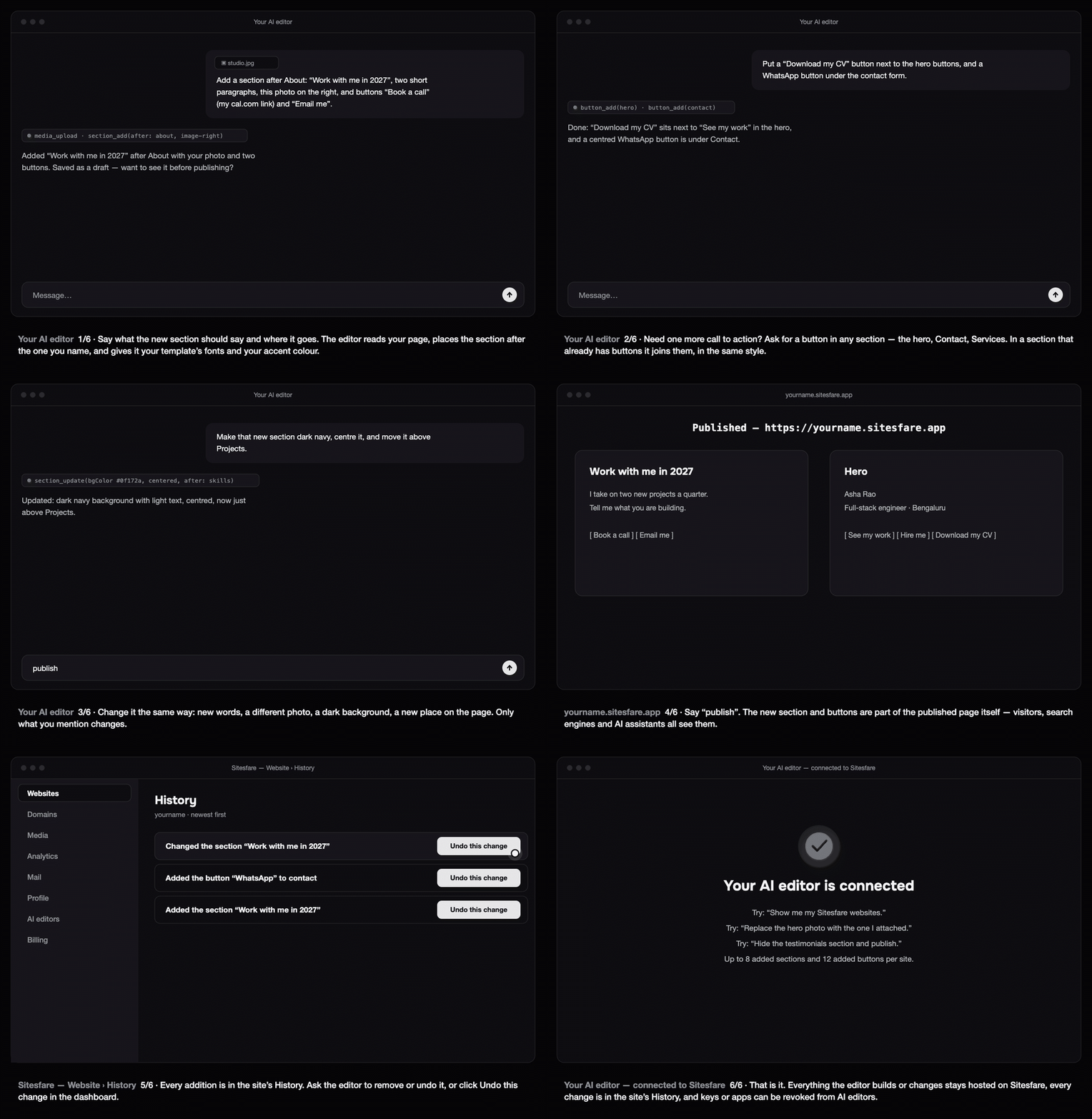
Once your AI editor is connected to Sitesfare, it can do more than fill in your template: it can add a new section of your own anywhere on the page, and add a new button to any section. You describe it in plain words; the editor does the rest.
Add a section
Tell the editor what the section says, what it shows and where it goes:
Add a section after About called "Work with me in 2027", with two short paragraphs, this photo on the right, and two buttons: "Book a call" to my cal.com link and "Email me".
What you can put in a section:
- a short line above the heading (a "kicker"), a heading and text — a blank line starts a new paragraph;
- a photo — attach it, or give an
https://link — on the left, on the right, or none; - up to three buttons, filled in your accent colour or outlined;
- a background colour — the text turns light on a dark colour by itself;
- the place: after any section, right after the header, or just before the footer.
The section uses your template's typefaces and text colour, so it sits in the page as if it had always been there, on phones and on desktops.
Add a button
Name the section, the words and the link:
Put a "Download my CV" button next to the buttons in the hero, and a WhatsApp button under the contact form.
A button can link to a website (https://…), an email (mailto:…), a phone number (tel:…), a page of your site (/resume) or a place on the page (#contact). In a section that already has buttons, the new one joins them in the template's own button style; elsewhere it gets a row of its own just below the section.
Change it, move it, remove it
Say what to change — only that changes:
- "Change the heading to 'Two slots left for 2027'."
- "Make it dark navy and centre it."
- "Move it above Projects."
- "Change the WhatsApp button to say 'Message me'."
- "Remove the section we added."
You can also hide an added section from the dashboard's preview, like any other section.
Publish
Additions are saved as a draft. Say "publish" and they go live on yourname.sitesfare.app (or your own domain). They are part of the published page itself, so visitors, search engines and AI assistants all read them.
Undo
Every addition and change is in your website's History with who made it. Ask the editor to undo it, or click Undo this change in the dashboard.
Good to know
- Up to 8 added sections and 12 added buttons per website; up to 3 buttons in a section.
- Plain text only — no HTML or embedded code. That keeps pages fast, accessible and safe. For a fully custom page, build and host your own design.
- It works on every Sitesfare template: portfolios, business websites, wedding and celebration sites, stores and housing societies.
Example prompts
- "Add a 'Pricing' section before Contact with three lines of text and a 'Get a quote' button to my email."
- "Add a dark 'As featured in' section after the hero, centred, with one line of text."
- "Put a 'Book a table' button in the hero linking to https://example.com/book."
- "Add a 'Visit us' section at the end with our address and a 'Get directions' button to Google Maps."
- "Show me the sections we added, then remove the second one."
The full list of what an editor can do is on the tools page.
Questions
Will the new section look like the rest of my site?
It uses your template’s typefaces and text colour and your site’s accent colour for buttons, and it is laid out for phones and desktops. A button added to a section that already has buttons uses the template’s own button style.
Where can a section go?
After any section of the page, at the start (right after the header) or at the end (before the footer). An added section can also follow another added section.
What can a button link to?
Any https:// website, an email (mailto:), a phone number (tel:), a page of your site (/resume) or a place on the page (#contact). Links to scripts or files are refused.
Can I write HTML or embed code in the section?
No — sections take plain text, a photo and buttons; the formatting is done for you. That keeps every page fast, accessible and safe. For a fully custom page, build your own design and host it on Sitesfare.
Is there a limit?
Up to 8 added sections and 12 added buttons per website, each section with up to 3 buttons. Headings hold 120 characters and the text 1,500.
Can I edit the new section in the dashboard?
You can hide it from the dashboard’s preview like any section, and every change is in History. Its words and buttons are changed through your AI editor.